
Skip to content
  • There are no suggestions because the search field is empty.

Configure Default PDF Viewer GPO Template

Explains the GPO template setting used to forbid the default PDF viewer check and verification prompt in Foxit PDF Editor.

Answer

Download and install GPO templates
Foxit PDF Editor has .adm and .admx files available to download here .

If using the admx template1. Install the .admx file:
  • Place the .admx file in C:\Windows\PolicyDefinitions and configure the settings.
  • The .admx file should be used in combination with an .adml file. Place the .adml file in C:\Windows\PolicyDefinitions\language. For example, in an English OS, the .adml file should be placed in C:\Windows\PolicyDefinitions\en_us.
2. Configure settings:Press Win+R and type "gpedit.msc", then select Computer Configuration -> Administrative Templates, choose Foxit PDF Editor -> Preference -> File Association, double-click "forbid checking of default PDF viewer", select "Enabled", and click "OK".================================================================= If using the adm template1. Install the adm template, follow the steps below:
  • Press the shortcut keys "Windows + R" and type gpedit.msc in the Run window to open Group Policy Editor.
  • Right-click the management template and choose Add/Remove Template in the context menu. In the opened dialogue box, add the group policy template (.adm) of Foxit PDF Editor. The Foxit PDF Editor template will appear in the left navigation pane "Classic Administrative Templates(ADM)", and you can set its template preferences.
2. Configure settings:Select Classic Administrative Templates(ADM) -> Foxit PDF Editor -> Preference -> File Association, double-click "forbid checking of default PDF viewer", select "Enabled", and click "OK". =================================================================Notes after completing the configuration:
  • After modifying the DC's GPO template, if you need it to take effect immediately, run "gpupdate" on the client machine's cmd to actively update the group policy.
  • The client machine will actively update the group policy after restarting.
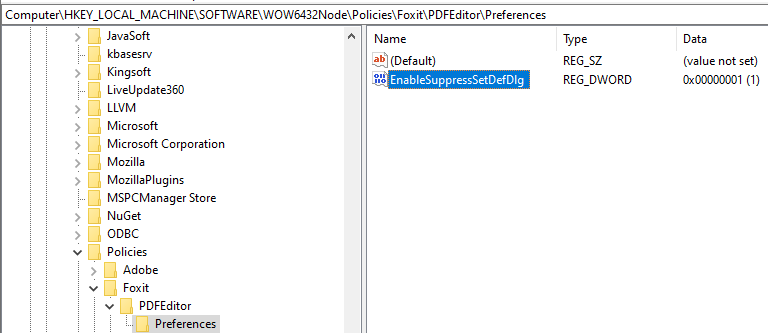
Verify the client's configuration update:Check if the registry has been updated: Computer\HKEY_LOCAL_MACHINE\SOFTWARE\WOW6432Node\Policies\Foxit\PDFEditor\Preferences, and look for a new item "EnableSuppressSetDefDlg" with a value of 1.